



By now, most of us are familiar with multi-factor authentication (MFA). When a system requires multiple steps to log into an account it becomes harder for bad actors to access your data. MFA is one of the easiest ways small organizations, nonprofits, and associations can stop cyberattacks before they start. But with so many options available, choosing the right MFA method isn’t always clear.
This guide will help you determine the right MFA approach for your team based on risk, usability, and the technology you already have.
Identify What You’re Protecting
Not all systems carry the same risk. Think about where your sensitive data lives:
- Email, collaboration tools (Microsoft 365, Google Workspace)
- Donor/member data or financial records (QuickBooks, CRMs)
- Remote access (VPNs, RDP)
- Cloud apps that store personal or regulated data
The more sensitive the system, the stronger the MFA should be.
Know Your Users
Your MFA must work for everyone who needs access:
- Do staff use personal phones or company devices?
- Do some employees or volunteers not have smartphones?
- Are users frequently remote?
- Do roles change often (contractors, interns, seasonal workers)?
In general, if MFA isn’t accessible, adoption drops and security suffers.
Compare Authentication Strength
Here’s how common MFA methods rank from weakest to strongest:
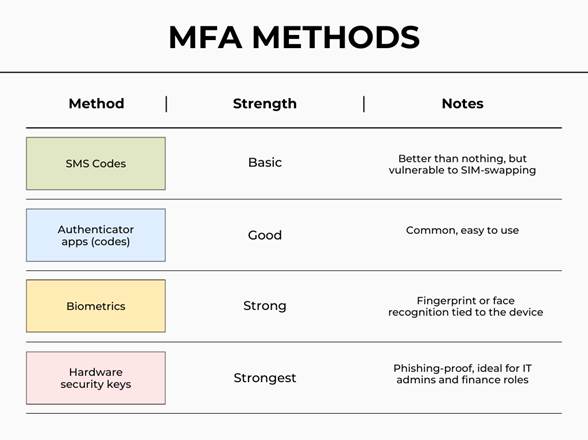
If your organization handles regulated data (healthcare, financial services, legal) stronger, phishing-resistant MFA is quickly becoming a requirement.
Prioritize Ease of Use
Cybersecurity only works if people actually use it. Ask:
- Is setup simple?
- How many steps to log in each time?
- Are there options for offline authentication?
A solution employees can’t navigate will lead to bypass attempts or support tickets.
Review Costs and Licensing
Good news: many MFA solutions are already included in tools you own.
- Is MFA included in your existing platform (e.g., Microsoft 365, Azure AD)?
- Will hardware keys or premium licenses be needed?
- What’s the long-term cost to scale?
Given these points, choose the strongest option your budget allows.
Plan for Backup Options
Devices break. Phones get lost. Batteries die.
To prevent lockouts:
- Allow at least two MFA methods per user
- Document how to regain access securely
- Train employees on what to do if they’re locked out
In the long run, resilience matters just as much as security.
Support and Educate Your Users
Explain why MFA matters and provide simple setup instructions.
- Quick video or step-by-step guide
- Office hours or a help channel for questions
- Spotlight the difference MFA makes in stopping phishing attacks
Adoption improves when users understand the impact.
The Right MFA Method Isn’t One-Size-Fits-All
By and large, cyber attackers increasingly target small organizations because they assume security will be weaker. MFA changes that, but only when it’s implemented thoughtfully and consistently.
If you’d like support choosing the right MFA method for your team, OptfinITy can help you strengthen access security without slowing down productivity.

Leave a Reply