
By -- 2026-01-6 in Blog

For years, passwords have been the default security layer for most organizations — and one of the weakest. Weak credentials, reused logins, and phishing continue to drive many breaches, particularly in small and mid-sized environments. That is why more leaders are exploring passwordless authentication as a modern, more secure alternative that reduces reliance on traditional passwords altogether.

The real question is no longer whether passwordless is coming. It is how small organizations should think about it — and whether now is the right time to begin moving in that direction.

What Does “Passwordless” Actually Mean?

Passwordless authentication replaces traditional passwords with more secure, device-bound, or biometric verification methods such as:

  • Biometrics (FaceID, fingerprint, Windows Hello)
  • Hardware security keys (e.g., YubiKeys)
  • Passkeys tied to devices and identity providers
  • Push approvals through trusted authentication apps

Instead of remembering and resetting passwords, users verify identity using factors that are:

  1. Harder to steal,
  2. Bound to a device or biometric, and
  3. Verified by a trusted identity service.

It shifts the experience from “type your password” to “prove it is really you.”

Why So Many Organizations Are Moving Toward Passwordless

1. Stronger Security

Compromised passwords remain one of the most common attack vectors.

Passwordless helps reduce:

  • Credential reuse across multiple sites,
  • Successful phishing attempts,
  • Exposure from credential dumps and password leaks.

Even when attackers possess email addresses or usernames, they still cannot authenticate without the trusted factor.

2. Better User Experience

Passwords are frustrating. They get forgotten, mistyped, written down, and reset.

Passwordless can:

  • Reduce login friction,
  • Cut down on account lockouts,
  • Lower the number of help desk tickets tied to passwords.

Security becomes simpler and more intuitive.

3. Lower Support Costs Over Time

Password resets consume meaningful IT time.

As password-related support declines, your team can concentrate on higher-value work instead of constant recovery tasks.

A Smart Way to Start: Think “Pilot,” Not “Big Bang”

For most small organizations, the safest path forward is gradual and intentional:

  1. Strengthen the basics first
     Ensure MFA, patching, device management, and identity controls are in good shape.
  2. Select a limited use case
     Choose one system or workflow where passwordless offers clear benefit.
  3. Roll out to a pilot group
     Start with IT and a small, tech-comfortable group of users. Capture lessons learned.
  4. Document simple guidance
     Provide short instructions, FAQs, and support contacts.
  5. Expand steadily
     Extend the model only after the pilot runs smoothly.

This allows your organization to improve security without disrupting daily operations.

Bottom Line: Is Passwordless Right for Small Organizations Yet?

In many environments, the answer is yes — when implemented deliberately.

Passwordless can:

  • Reduce credential-based risk,
  • Improve everyday user experience,
  • Lower support overhead over time.

However, success depends on thoughtful planning, compatible systems, and clear communication with users. Organizations that take a phased, intentional approach typically see the greatest benefit.

Want help evaluating whether it makes sense for you?

If you are weighing passwordless authentication — or want clarity on where to start — our team can assess your environment, identify gaps, and outline a realistic roadmap.

Reach out to OptfinITy, and we will help determine whether passwordless is the right next step for your organization.

By -- 2026-01-2 in Blog

The start of a new year is the right time to pause and run a quick IT health check — not a full overhaul, just a focused review to catch risks, reduce waste, and prevent avoidable surprises.

Use this IT health check checklist to work through the essentials.

1. Confirm what you own — and who has access

  • List devices (laptops, desktops, servers, networking gear).
  • List software and subscriptions.
  • Remove accounts for people who left.
  • Reduce unnecessary admin access.

Over time, tools multiply, permissions expand, and nobody remembers why. Make sure there is one source of truth for hardware, software, and users — and review it quarterly.

2. Make sure patches and updates are happening

  • Confirm updates are automated.
  • Include firewalls, switches, Wi-Fi, and servers.
  • Verify someone checks that updates actually succeed.

Most breaches are not “sophisticated.” They happen because a known vulnerability was never patched. Automate, monitor, and document updates wherever possible.

3. Test backups — don’t assume they work

  • Confirm what is backed up (files, email, servers, cloud apps).
  • Confirm where backups live (on-site, cloud, both).
  • Perform at least one test restore.

Many organizations discover the truth about backups during a crisis. By then it’s too late. Put backup testing on the calendar for at least twice a year.

4. Strengthen passwords and MFA

  • Turn on MFA for email, remote access, and sensitive systems.
  • Remove shared passwords where possible.
  • Limit admin accounts.

Compromised credentials remain one of the top causes of data breaches. Adopt MFA widely, strengthen password policies, and remove unnecessary access.

5. Clarify what happens during an incident

  • Who do we call first?
  • How do we isolate a device safely?
  • Where are vendor/IT contacts stored?
  • Is the plan documented and easy to find?

Document a simple, realistic incident response plan, review it annually, and make sure leadership knows where it lives.

6. Eliminate licensing waste

  • Cancel unused licenses.
  • Remove “temporary” licenses that lingered.
  • Consolidate overlapping tools.
  • Use features you already pay for.

Many organizations pay for software that they no longer use. In essence, these hidden expenses can add up, and it’s worth taking a look to make sure your organization is utilizing all of the tools you pay for.

7. Align tech with 2026 goals

  • What are we trying to grow, protect, or improve?
  • What tech may slow us down if we ignore it?
  • What should be planned, not reacted to?

Use your health check findings to build a simple roadmap for upgrades, security enhancements, and efficiencies across the year.

Final thought: Why an IT health check matters in 2026

A quick IT health check now can prevent outages, security incidents, and surprise costs later. In short, small, consistently reviewed steps make organizations safer and more resilient.

When you partner with OptfinITy we take care of all of the above (and more) to help keep your organization secure and running efficiently. Contact us today for a free assessment.

By -- 2025-12-30 in Blog

Every January, organizations set ambitious technology goals, only to watch them fade as the year gets busy. The problem is not a lack of intention, but a lack of realism. The most effective IT resolutions are practical, measurable, and tied directly to how your team works.

Here are a few technology resolutions small organizations can realistically commit to and maintain throughout the year.

1. Simplify and Standardize Your Tools

Many teams are paying for overlapping software or juggling too many platforms. Commit to reviewing what tools are actually being used, eliminating duplicates, and standardizing where possible. Fewer systems mean lower costs, better security, and less frustration for staff.

2. Strengthen the Basics of Cybersecurity

You do not need an enterprise-level overhaul to improve security. A realistic resolution might include enabling multi-factor authentication where it matters most, ensuring devices receive updates on time, or scheduling regular security awareness reminders for staff. Small, consistent improvements reduce real risk.

3. Plan for Technology Before It Breaks

Reactive IT is expensive. Resolve to track the age and condition of critical devices and plan replacements before failures disrupt your operations. Even a simple annual technology review can prevent surprise costs and downtime.

4. Reclaim Time Lost to Technology Issues

Technology should support your mission, not slow it down. Pay attention to recurring pain points (slow systems, login issues, unreliable remote access) and make it a goal to address them proactively. The return on investment is often measured in hours regained, not just dollars saved.

The Takeaway

The best IT resolutions are not dramatic- they are sustainable. When technology decisions are intentional and aligned with how your organization operates, they are far more likely to stick.

If you want help turning realistic IT goals into a plan your organization can actually maintain, OptfinITy is here to help. Contact us at info@optfinITy.com or (703) 790-0400.

By -- 2025-12-26 in Blog

Many organizations are unknowingly overpaying for software licenses they no longer need, no longer use, or never fully deployed in the first place. This kind of licensing waste rarely shows up as a red flag, but it steadily erodes budgets that could be better spent elsewhere.

If you have not reviewed your technology licenses recently, there is a good chance some hidden waste is already baked into your operating costs.

Why Licensing Waste Happens So Easily

Licensing waste is rarely the result of poor decision-making. In most cases, it is a byproduct of growth, change, and good intentions.

Common scenarios include:

  • Employees who leave but still have active licenses
  • Role changes that reduce software needs, without adjusting access
  • “Just in case” licenses purchased during busy periods
  • Overlapping tools that solve the same problem
  • Bundled features that are paid for but never used

Cloud software makes it easy to scale up quickly. Unfortunately, it does not always make it easy to scale back down.

Over time, organizations accumulate licenses the same way they accumulate browser tabs: each one made sense at the moment, but together they become inefficient and hard to manage.

The Real Cost of Over-Licensing

The obvious impact of licensing waste is financial. Paying for unused or unnecessary licenses means money is leaving your budget every month without delivering value.

However, the hidden costs often go beyond dollars.

Over-licensing can also lead to:

  • Increased security risk from unused or unmonitored accounts
  • Confusion about which tools are approved or supported
  • More complex onboarding and offboarding processes
  • Reduced ROI from tools your organization already owns

When no one has clear ownership of license management, technology sprawl becomes harder to control, and accountability becomes blurred.

Common Signs You May Be Overpaying

You do not need a full audit to spot early warning signs. If any of the following sound familiar, licensing waste may already be present.

  1. You are unsure how many licenses you actually use
    If your team cannot confidently answer how many licenses are active versus how many are needed, that gap often hides unnecessary spending.
  2. Former employees still appear in admin portals
    Inactive users are one of the most common sources of waste and risk. Even if access is limited, unused licenses still cost money.
  3. Multiple tools serve similar functions
    For example, paying for several file-sharing, messaging, or project management platforms at the same time, because different teams prefer different tools.
  4. You upgraded plans “temporarily” and never revisited them
    Many organizations move to higher tiers during busy seasons, transitions, or security pushes, and forget to reassess later.
  5. Licenses renew automatically without review
    Auto-renewals are convenient, but they remove the natural pause that forces a cost-benefit check.

How to Start Identifying Licensing Waste

You do not need to overhaul everything at once. A few focused steps can surface quick wins.

Inventory your tools
Start by listing all software subscriptions your organization pays for, including core platforms and smaller add-ons. You may be surprised how many tools appear on expense reports or credit card statements.

Review user activity
Look at login data, usage reports, and access levels. Identify licenses tied to inactive users or rarely used features.

Match licenses to roles, not individuals
Different roles require different access. Align licensing tiers with actual job functions rather than assigning the same license to everyone.

Check for overlap
If two tools solve the same problem, ask why both are needed. Consolidation often reduces costs without sacrificing capability.

Schedule regular reviews
Licensing should not be a one-time cleanup. Quarterly or semi-annual reviews help prevent waste from rebuilding quietly.

The Takeaway

Licensing waste is easy to miss, but it adds up quickly in both cost and risk. A simple review can uncover unused licenses, reduce complexity, and ensure your technology spend aligns with how your team actually works.

Partnering with a managed service provider like OptfinITy can take that responsibility out of your hands. Interested in learning more? Give us a call today at (703) 790-0400 or email us at info@optfinITy.com.

By -- 2025-12-23 in Blog

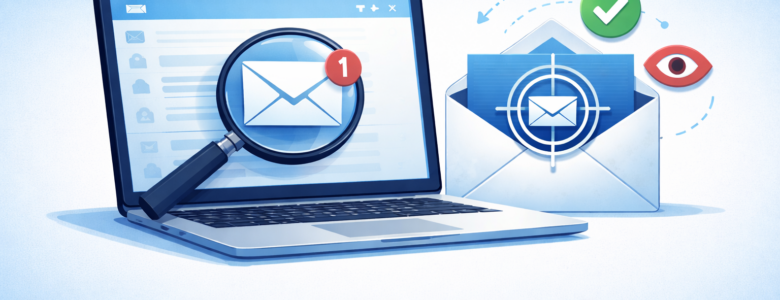
Most organizations view promotional emails as harmless background noise—messages you skim, delete, or ignore. But behind many of those discounts and holiday offers is a quiet data-collection practice that deserves more attention.

Email tracking has become standard in modern marketing, and it extends further than most people realize.

The Problem: Invisible Tracking Inside Emails

Many promotional emails include hidden tracking elements, often invisible images or coded links that activate the moment an email is opened. More often than not, these trackers capture information such as:

  • When and how often an email is opened
  • The device or email client being used
  • General location data
  • Engagement behavior, such as link clicks or scrolling

While this data is typically framed as “marketing analytics,” it is gathered automatically and often without clear user awareness.

The Impact: Why This Matters for Organizations

For individuals, this may feel like a minor privacy issue. For organizations, the implications are broader:

  • Increased data exposure: Email engagement data can be aggregated to build detailed behavioral profiles.
  • Security blind spots: Employees may unknowingly trigger tracking while reviewing emails on work devices.
  • Inbox manipulation: Engagement signals can lead to more aggressive targeting, higher email volume, and greater distraction for staff.

During high-volume periods—such as holidays or major campaigns—this activity increases significantly, compounding both privacy and productivity concerns.

The Solution: Reducing Risk Without Disrupting Work

Organizations do not need to eliminate email marketing to reduce exposure. Practical steps include:

  • Blocking remote images and tracking pixels by default in email clients
  • Using spam and promotional filters to limit accidental engagement
  • Training staff to recognize that “opening” an email can be a form of data sharing
  • Separating personal sign-ups and newsletters from work email accounts

Partnering with a managed service provider like OptfinITy can help safeguard your organization against promotional email tracking. These measures help reduce unnecessary data leakage while keeping communication channels functional.

The Takeaway

Email is still one of the most common entry points into an organization’s digital environment. Understanding how even routine promotional messages collect data is part of managing modern risk.

A more intentional approach to inbox security protects not just privacy, but time, focus, and organizational awareness.

By -- 2025-12-19 in Blog

Sometimes, the biggest cybersecurity risks come from the tools we’re most comfortable with. When an organization adopts new technology (say, moving from Microsoft 365 to Google Workspace) it can feel easier to keep using the apps you already know. But while shadow IT may save a few minutes in the moment, it can unintentionally expose sensitive data.

Shadow IT refers to any hardware, software, app, or cloud service employees use for work that hasn’t been approved by the organization’s IT team. It often starts with harmless convenience, but it can quickly create serious security gaps and compliance issues.

In this blog, we’ll explore the hidden dangers of Shadow IT — and what your organization can do to reduce the cyber risks that come with unapproved technology.

Examples of Shadow IT

Doing the following may seem innocuous, but in reality, are ways you can put your company at risk:

  • Using different messaging or collaboration platforms than what’s approved (e.g., using Slack when your organization uses Asana)
  • Turning to free online tools, like AI chatbots (e.g., ChatGPT) or grammar checkers (e.g., Grammarly), for sensitive work content
  • Storing company files on personal cloud drives (e.g., OneDrive, Dropbox, Google Drive)
  • Connecting personal devices — laptops, tablets, or phones — to the company network

Why It Happens

Shadow IT often comes from a good place: trying to stay efficient and productive. But when employees are required to use unfamiliar tools, frustration can lead them to bypass the approved options.

The most common reasons include:

  • Familiarity: Sticking with apps they already know feels easier than learning a new platform.
  • Convenience: If the company’s required tools are restrictive or slow, employees may default to different technologies to make their lives easier.
  • Speed: Deadlines are real, and using a familiar system can seem like the quickest path forward.

The Risks of Shadow IT

Choosing convenience over compliance may feel efficient, but it introduces major security concerns:

  • Data exposure: Unapproved apps can create backdoors for attacks or accidental data leaks
  • Loss of control: Sensitive information may end up stored in unsecured personal accounts
  • Lack of visibility: IT teams can’t secure or support tools they don’t know about
  • Compliance violations: Personal storage or messaging apps can violate regulations like HIPAA or financial data standards

How Organizations Can Reduce Shadow IT

With the right approach, leaders can empower productivity and protect systems:

  • Partner with a trusted Managed Service Provider (MSP) like OptfinITy to conduct audits and identify unapproved apps
  • Provide training so employees understand why approved tools matter for security and compliance
  • Set clear policies that outline acceptable technology usage — and reinforce them regularly
  • Listen to employee feedback to ensure IT-approved tools support productivity, not hinder it


Book a free security consultation with OptfinITy to uncover hidden vulnerabilities and strengthen your defenses.

By -- 2025-12-16 in Blog

By now, most of us are familiar with multi-factor authentication (MFA). When a system requires multiple steps to log into an account it becomes harder for bad actors to access your data. MFA is one of the easiest ways small organizations, nonprofits, and associations can stop cyberattacks before they start. But with so many options available, choosing the right MFA method isn’t always clear.

This guide will help you determine the right MFA approach for your team based on risk, usability, and the technology you already have.

Identify What You’re Protecting

Not all systems carry the same risk. Think about where your sensitive data lives:

  • Email, collaboration tools (Microsoft 365, Google Workspace)
  • Donor/member data or financial records (QuickBooks, CRMs)
  • Remote access (VPNs, RDP)
  • Cloud apps that store personal or regulated data

The more sensitive the system, the stronger the MFA should be.

Know Your Users

Your MFA must work for everyone who needs access:

  • Do staff use personal phones or company devices?
  • Do some employees or volunteers not have smartphones?
  • Are users frequently remote?
  • Do roles change often (contractors, interns, seasonal workers)?

In general, if MFA isn’t accessible, adoption drops and security suffers.

Compare Authentication Strength

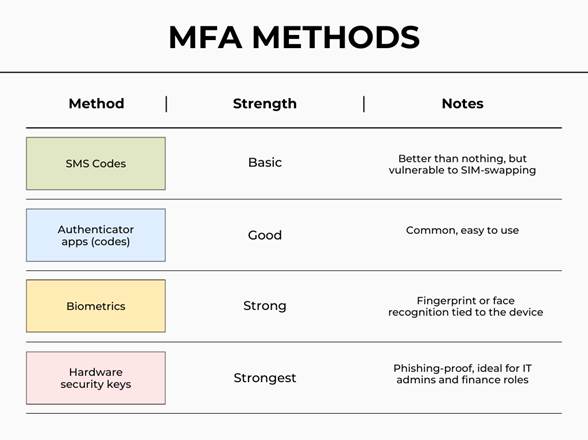
Here’s how common MFA methods rank from weakest to strongest:

Chart listing ways an individual can go about choosing the right MFA method.

If your organization handles regulated data (healthcare, financial services, legal) stronger, phishing-resistant MFA is quickly becoming a requirement.

Prioritize Ease of Use

Cybersecurity only works if people actually use it. Ask:

  • Is setup simple?
  • How many steps to log in each time?
  • Are there options for offline authentication?

A solution employees can’t navigate will lead to bypass attempts or support tickets.

Review Costs and Licensing

Good news: many MFA solutions are already included in tools you own.

  • Is MFA included in your existing platform (e.g., Microsoft 365, Azure AD)?
  • Will hardware keys or premium licenses be needed?
  • What’s the long-term cost to scale?

Given these points, choose the strongest option your budget allows.

Plan for Backup Options

Devices break. Phones get lost. Batteries die.

To prevent lockouts:

  • Allow at least two MFA methods per user
  • Document how to regain access securely
  • Train employees on what to do if they’re locked out

In the long run, resilience matters just as much as security.

Support and Educate Your Users

Explain why MFA matters and provide simple setup instructions.

  • Quick video or step-by-step guide
  • Office hours or a help channel for questions
  • Spotlight the difference MFA makes in stopping phishing attacks

Adoption improves when users understand the impact.

The Right MFA Method Isn’t One-Size-Fits-All

By and large, cyber attackers increasingly target small organizations because they assume security will be weaker. MFA changes that, but only when it’s implemented thoughtfully and consistently.

If you’d like support choosing the right MFA method for your team, OptfinITy can help you strengthen access security without slowing down productivity.

By -- 2025-12-12 in Blog

When your organization relies on technology to stay productive, every device has a lifecycle. You’ve likely noticed this with your personal devices: your phone that’s only a few generations old can barely hold a charge, or your laptop seemingly takes forever to load a single email. At some point, every device becomes less secure, slows down, or costs more to maintain than it’s worth. The question is: how do you know when it’s smarter to repair vs. when it’s time to upgrade?

A thoughtful approach to the technology lifecycle helps ensure your team stays productive, protected, and budget conscious.

When Repair Still Makes Sense

Repairs are typically the right move when:

  • The issue is minor or software related
  • The hardware is still within warranty
  • Performance is strong and security updates are still supported
  • Replacement parts are inexpensive and readily available

This approach stretches your investment and keeps familiar tools in your team’s hands. After all, learning how to use a new device can be time consuming, and thus costly.

When It’s Time to Upgrade

We all would like to avoid buying new devices for as long as we can, but eventually outdated tech will start causing more of a headache than it’s worth.

An upgrade becomes the better decision when:

Replacing outdated equipment may seem like a bigger expense, but it’s a smart investment in the long run. New devices can better prevent downtime, reduce cybersecurity risk, and unlock better capabilities.

A Strategic, Not Reactive, Decision

The best organizations don’t wait for failure. Instead, they maintain a proactive technology roadmap that accounts for security requirements, warranty expiration, and future growth. By planning ahead, you can ensure your devices are working for you, not against you.

Want to know if your organization could benefit from updated technology? At OptfinITy we offer free consultations and are more than happy to take a look at your current setup. Call us today at (703) 790-0400 or email us at info@optfinity.com.

By -- 2025-12-9 in Blog

As the year winds down, many leaders are already planning for what’s ahead — and cybersecurity remains a top priority. With cyber threats evolving quickly, understanding the cybersecurity trends for 2026 can help small businesses, nonprofits, and associations strengthen their defenses, protect sensitive data, and avoid costly disruptions.

Whether you manage a growing organization or operate with a lean staff, the landscape in 2026 will require proactive planning, stronger controls, and continued employee awareness.

1. AI-Powered Cyberattacks Will Increase

Artificial intelligence is no longer only a tool for security teams — bad actors are now using it to automate phishing campaigns, generate convincing messages, and identify vulnerabilities faster than ever.

Organizations should expect:

  • More sophisticated spear phishing
  • Fraudulent emails that mimic writing style or tone
  • Faster attack cycles and shorter detection windows

Solution: AI-based email filtering, multi-factor authentication, and ongoing staff training are essential.

2. Zero Trust Will Shift from Trend to Standard

“Trust but verify” is no longer enough. In 2026, more organizations will adopt Zero Trust security frameworks, requiring identity validation and access controls for every user and device.

Key components include:

  • Strong access control policies
  • Least-privilege permissions
  • Continuous authentication monitoring

This approach significantly reduces the damage a compromised account can cause.

3. Vendor and Third-Party Risk Will Become a Priority

Supply-chain attacks continue to rise, and smaller organizations are especially vulnerable when partners, apps, or cloud platforms are breached.

In 2026, expect:

  • More vendor compliance requirements
  • Mandatory security questionnaires
  • Increased scrutiny around cloud platforms and hosted applications

4. Cyber Insurance Requirements Will Tighten

Carriers are responding to increased claim frequency and payouts. Premiums may rise — and approval will require stronger controls.

Expect insurers to require:

  • MFA
  • Endpoint detection and response
  • Documented cybersecurity policies
  • Employee security awareness training

Investing in these now can help control future premiums.

5. Security Awareness Training Will Matter More Than Ever

Human error remains one of the top causes of breaches. Organizations that train employees regularly are far better positioned to prevent avoidable security incidents.

In 2026, expect user training to expand beyond phishing to include:

  • Password hygiene
  • Social engineering awareness
  • AI-generated attack recognition

Preparing Now Sets You Up for a More Secure 2026

Cyber threats aren’t slowing down — but with the right planning, tools, and employee education, small organizations can stay ahead.

By -- 2025-12-5 in Blog

Artificial intelligence tools are becoming more integrated into email platforms, raising new questions about security and transparency. The recent lawsuit involving Google AI and Gmail privacy highlights growing concern over whether AI systems should have access to personal or organizational emails by default.

In early November, a class-action lawsuit alleged that Google quietly shifted its Gemini AI features in Gmail, Google Chat, and Google Meet from an opt-in setting to opt-out — meaning many users may not have realized AI was being applied to their messages. While facts are still unfolding, the complaint suggests the AI may have had access to emails, attachments, chat conversations, and more.

How to Turn Off AI Features in Gmail

If you want to restrict AI access to your data, you can turn off smart features in just a few steps:

  1. Open Gmail → click the Settings (gear) icon → select See all settings.
  2. Scroll to Smart Features and Personalization.
  3. Toggle the setting off.
  4. If you use Google Workspace, repeat the process under Workspace privacy controls.
  5. Refresh Gmail to confirm the change.

Repeat these steps for any personal, business, or shared Gmail accounts.

Why This Matters Going Forward

This lawsuit represents a larger shift in how everyday software is evolving. As platforms bake AI into communication and productivity tools, privacy settings may become less obvious. As a result, some may be enabled without clear user action.

For organizations handling confidential or regulated data — including nonprofits, law firms, medical practices, and financial institutions — reviewing technology settings will become just as important as using secure tools.

Final Takeaway

AI-powered features can make communication more efficient — but they shouldn’t come at the cost of privacy or control. Taking a few minutes to update your Gmail settings now can help protect your information as technology continues to evolve.

Want a professional to check your security posture? OptfinITy has you covered. Contact us today at (703) 790-0400 or sales@optfinity.com for a free security assessment.